About USB BLOCKER
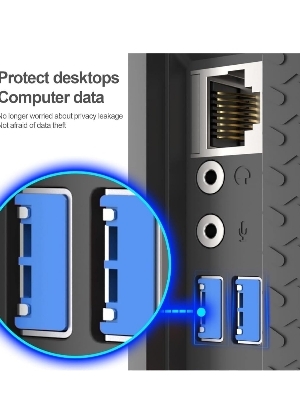
Brand-AUCAS Colour-Blue Hardware InterfaceUSB Special FeatureDust and Moisture Proof Total USB Ports-10 Material-Copper USB Port Blocker - Pack of 10(with key). Physically blocks access to a USB port. Quick and easy to use. Consists of 10 locks and 1 key. 6 different color code versions available: Black, White, Red, Yellow, Blue, Green.
Robust Physical USB Port SecurityProtect your devices from unauthorized access and physical damage with BrandAUCAS USB Blocker. This sturdy copper blocker fits snugly into any standard USB port, preventing both unwanted usage and the intrusion of dust or moisture. Its vibrant blue color facilitates quick identification among multiple devices.
Efficient Organization with Color CodingAvailable in six distinct colors, this USB blocker simplifies port management for various locations or departments. Color-coding lets users easily distinguish between levels of access or ownership, promoting efficient security protocols within your organization.
FAQ's of USB BLOCKER:
Q: How do I use the BrandAUCAS USB Blocker with Shield?
A: Insert the USB blocker into the port you wish to secure. Use the included key to lock or unlock the blocker for installation or removal, ensuring that only authorized users can access the port as needed.
Q: What devices are compatible with this USB port blocker?
A: This blocker is compatible with any device featuring standard USB ports, including computers, printers, or public access terminals commonly used in offices and institutions across India.
Q: When should I consider using a USB port blocker?
A: USB port blockers are recommended whenever you need to prevent unauthorized data transfer, protect sensitive equipment from dust and moisture, or manage access in shared environments such as offices, labs, or schools.
Q: Where can I purchase BrandAUCAS USB Blockers in India?
A: BrandAUCAS USB Blockers are available through authorized suppliers, traders, and distributors across India. You can find them at online marketplaces, electronics stores, or directly from security device vendors.
Q: What is the process to remove a USB blocker?
A: Simply insert the provided key into the blocker's slot and turn to unlock. The blocker can then be pulled out from the USB port and reused on another device if necessary.
Q: What are the main benefits of using these USB blockers?
A: The blockers help prevent unauthorized USB access, reduce the risk of data breaches, and shield ports from environmental hazards like dust and moisture, thereby extending the life of your devices.





 Send Inquiry


 Send Inquiry