About HDMI QUAD VIEWER 41
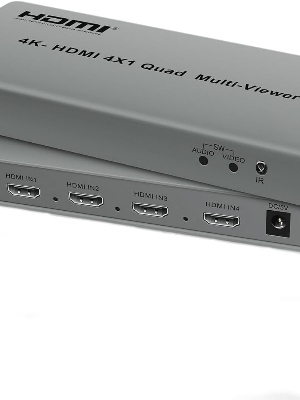
Flexible Viewing Options: The 4K@60hz HDMI multiviewer has 8 versatile viewing modes to display multiple signals on a single display, including: Full Screen, Dual Side-by-Side, Dual Top and Bottom, PIP, 4 Equal Screens, and 1 Large and 3 Small Modes, providing flexible options for life and work. Seamless Switching: The 4 in 1 HDMI Multi switch ensures seamless switching between four HDMI input sources when used in full screen, enabling the functionality of a hdmi switch as well as the ability to display multiple sources on a single display. This ensures a pleasurable viewing experience. Universal Compatibility: The HDMI quad multi-viewer is compatible with a wide range of HDMI devices such as security cameras, x-box, blu-ray players, HDTVs, projectors, monitors and more. plug and play, easy to operate. Helps realize the versatility of various applications High-Resolution Support: The multi HDMI adapter supports 4k@60hz, 4k@30hz, 1080p and is backward compatible with HDCP 2.2, HDCP 2.0 and HDCP 1.4. The HDMI Switch supports synchronized audio transmission without latency and lag for enhanced audio and visual enjoyment. Two Ways To Switch: The HDMI switcher supports two switching methods, so you can choose the signal source at will and enjoy high-quality video and audio easily. Whether you use the remote control on the sofa or press the buttons on the device directly, you can quickly switch to meet the needs of various scenarios.
Flexible Multi-Source ViewingThe HDMI Quad Viewer 41 enables you to connect and display up to four HDMI sources on a single display, making it suitable for control rooms, security applications, and multimedia environments. Effortlessly switch between quad, dual, triple, or full screen layouts to monitor multiple feeds simultaneously with optimal clarity.
User-Friendly Control OptionsEasily navigate and control the HDMI Quad Viewer using the responsive front panel buttons or the included IR remote control. Users can switch inputs, adjust modes, and manage the display configuration quickly, reducing downtime and streamlining AV operations in any setup.
Reliable Performance and Build QualityConstructed in a metal case for enhanced durability and superior heat dissipation, this quad viewer is engineered for continuous use. The system is HDCP compliant and features clear LED status indicators as well as a 5V/2A power supply, ensuring stable and efficient operation in demanding environments.
FAQ's of HDMI QUAD VIEWER 4A1:
Q: How do I switch between different viewing modes on the HDMI Quad Viewer 41?
A: You can switch between quad, dual, triple, and full screen modes using either the front panel buttons or the included IR remote control, giving you instant flexibility in how you view your connected HDMI sources.
Q: What types of devices are compatible with the HDMI Quad Viewer 41?
A: This unit supports any device with an HDMI output, including PCs, security cameras, DVD players, and set-top boxes. It is HDCP compliant, ensuring trouble-free compatibility with various digital content sources.
Q: When is it beneficial to use the quad view feature of this HDMI viewer?
A: Quad view is particularly useful in monitoring applications, such as surveillance, live events, or control centers, where observing multiple sources simultaneously on a single screen is essential for efficient decision-making.
Q: Where can the HDMI Quad Viewer 41 be installed?
A: The viewer is designed for versatile installation. It can be placed on a desktop or rack-mounted, making it suitable for use in offices, AV rooms, security sites, and broadcast environments.
Q: What is the process for connecting audio output from the HDMI Quad Viewer 41?
A: Simply connect your external speaker system or audio device to the dedicated audio output port. This allows audio from the selected HDMI input to be routed and played separately from the main video output.
Q: How does the metal chassis benefit long-term operation of the device?
A: The robust metal case not only enhances durability but also improves heat dissipation. This design feature ensures the unit remains cool and stable during continuous, extended operation, improving longevity.
Q: What are the main advantages of having LED input and output indicators?
A: LED indicators provide immediate feedback on the connection status of each input and the output. This helps users quickly identify active sources and troubleshoot connection issues without interrupting device operation.






 Send Inquiry


 Send Inquiry